Guitar Tuning Guide: How to Tune Your Guitar Correctly
Whether you're a beginner learning your first chords or an experienced player preparing for practice, keeping your guitar properly tuned is essential.
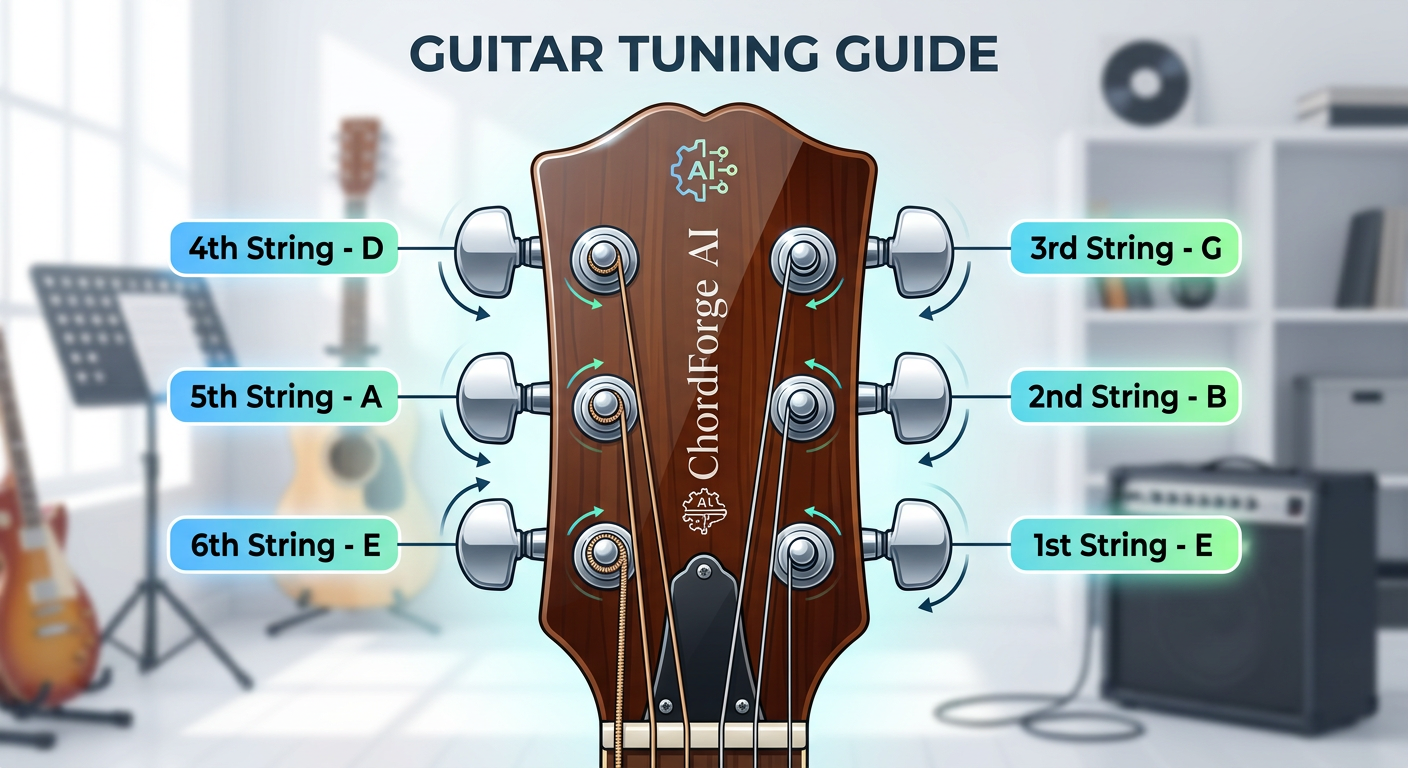
The image above shows the standard tuning for a six-string guitar and identifies which tuning peg controls each string.
A well-tuned guitar sounds better, makes learning easier, and ensures your chords and melodies are played exactly as intended. Refer to the diagram above whenever you're unsure which peg to adjust while tuning.
Standard Guitar Tuning
A standard six-string guitar is tuned to the musical sequence: E – A – D – G – B – E
Starting from the thickest string (lowest pitch) to the thinnest string (highest pitch):
- 6th String – E (Low E)
- 5th String – A
- 4th String – D
- 3rd String – G
- 2nd String – B
- 1st String – E (High E)
Note: The 6th and 1st strings are both E notes, but the 1st string is voiced multiple octaves higher in pitch.
Understanding the Tuning Pegs
Each guitar string connects directly to an individual tuning peg on the headstock. Turning a peg alters the structural tension of the string:
- Tightening a string raises the pitch.
- Loosening a string lowers the pitch.
Before turning any hardware, cross-verify that you are adjusting the specific tuning peg connected to the target string. The illustration above details the functional peg pathways.
How to Tune Your Guitar Using ChordForge AI
Open the ChordForge AI Guitar Tuner dashboard and allow system microphone access configuration when prompted by your browser window.
Pluck one open guitar string at a time cleanly, allowing the note to sustain naturally.
Monitor the live needle interface display tracker:
- If the tracking metrics state the frequency pitch is Flat, slowly tighten the peg.
- If the tracking metrics state the frequency pitch is Sharp, slowly loosen the peg.
Continue executing minor adjustments until the precision interface indicates that the string frequency is in perfect, green center alignment.
Repeat this loop sequencing across all six individual string layouts.
Common Beginner Mistakes
Turning the Wrong Peg
Many beginners adjust an adjacent peg by mistake. Trace the physical path of the string up to the headstock before executing turns.
Over-Adjusting
Large, rapid mechanical rotations cause drastic pitch volatility and risk snapping thinner guitar string cores. Use small tweaks.
Ambient Noise Blurring
Extraneous room noise degrades the accuracy of browser sound capture models. Tune in a quiet environment.
Why Tuning Matters
Playing on poor pitch baselines distorts basic chord tracking matrices and hinders natural ear training development. Making it a consistent habit to tune up before sessions accelerates instrument familiarity and ensures clean tone outputs.